Technology. [sigh] A challenge and a wonder! I’ve experienced the full-frustration-ready-to-explode load of trying to make a book trailer without the needed skillset. And…MANY hours later, the joy of the finished trailer. If only I had had this post. Thanks, Kari Gonzalez for sharing how you made the trailer for your new release, HOW TO HATCH A READER.
Kari is offering a giveaway! Winner’s choice of a “20-minute Ask Me Anything” or a copy of HOW TO HATCH A READER.
Congrats to Donna Gwinnell Lambo-Weidner, winner of Elizabeth Shreeve’s THE UPSIDE-DOWN BOOK OF SLOTHS!
Creating a Book Trailer with Canva by Kari Gonzalez 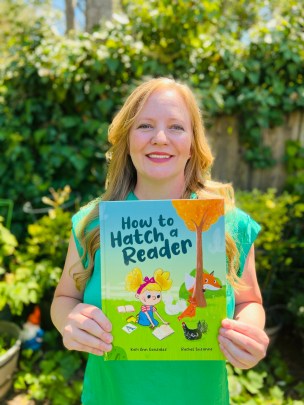
So, I’d been patiently waiting for years for my beautiful book How To Hatch A Reader to print and land in reader’s hands. Suddenly my cover reveal had come and gone and I realized I needed a book trailer! I double-checked with my publisher, but they did not have plans for one.
My heart started going into double-time thinking about how to create a quality book trailer. Could I create a trailer with no experience in specialty software, without a budget? After attending a local SCBWI PAL conference I met a few lovely new friends who helped demystify the book trailer creation process. Thank you to Connie Goldsmith, JaNay Brown-Wood, Patricia Newman and Linda Joy Singleton!
I learned there are many options to create trailers such as Windows Movie Maker or Animoto, but I selected Canva which has a free version and is being widely used by the author community to create social media graphics. I started by visiting The Fussy Librarian’s Best Practices for Creating a Great Book Trailer to learn about what to include and read some best practices.
Then, I analyzed book trailers for research to see what I loved, what I liked, and what I would have done a little differently. I love Kidlit TV’s Kidlit Book Trailers page which hosts a number of picture book trailers. I loved watching these for inspiration and to add more books to my to-be-read list!
Research completed, it was time to storyboard. I decided I wanted the light-hearted tone of the story to be reflected in the book trailer. I wrote a script and started with a catchy question to gain attention and also subtly capture the book’s name and theme. “Have you ever wondered how to hatch a reader?” Then, I added a few plot points, jokes, and reading support techniques from the book and ended the script by circling back to the beginning question, “So, if you have ever wondered how to hatch a reader, I’ll tell you a secret…it starts with a good book!”
With the script in hand, I needed to decide if I was going to voice the script or have the script appear on the video. As I toiled with this question, the answers to my dilemma sauntered into the room requesting their ninety-ninth snack and asking what I was doing. My kids jumped at the opportunity to be in my ‘book trailer movie’ and suddenly I had voiceover artists!
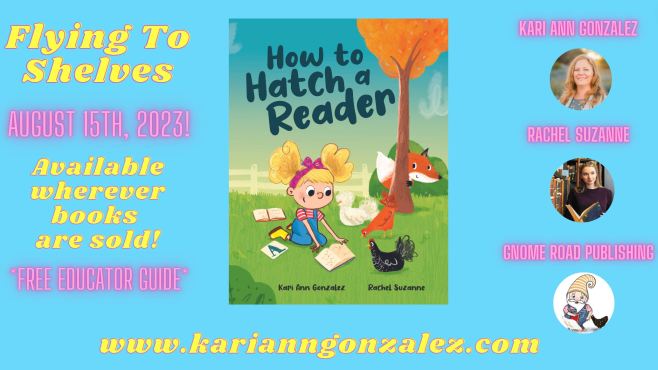
For my book trailer cover, I created a cover graphic displaying the front book cover for marketing and branding. I also wanted to include one of the book characters, an image of a reading chicken to give a glimpse of what was to come. For the closing slide, I wanted to display my book cover again and share vital details such as the release date, where to buy the book, that there is a free educator guide available, and also list author, illustrator, and publisher. Then, I backtracked into the middle of the book trailer and selected spreads from my book that I felt would align well with my script. Some publishers don’t care for the full spread to be used, so ask first.
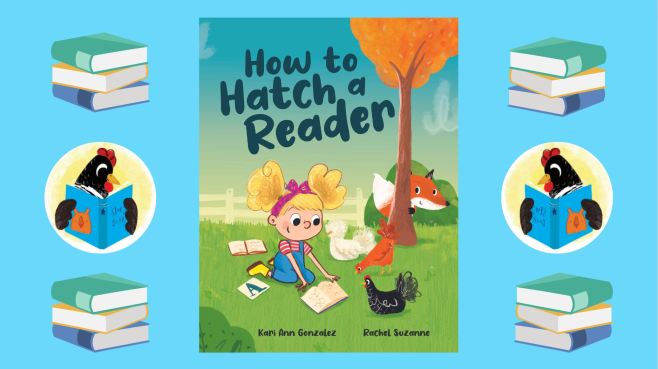
Now it was time to start putting things together. I selected a Canva video template and adjusted it to six pages: one opening, four interior pages that would feature some of my spreads and then one closing page. Notice I limited pages to keep the trailer timeframe short, targeting 30 seconds. I uploaded screen captures of spreads from my digital book PDF into Canva, then dragged and dropped those into my individual Canva template pages. I screen-captured a high-resolution book cover, and photos of myself, the illustrator, and the publisher’s graphic to display on the closing slide.
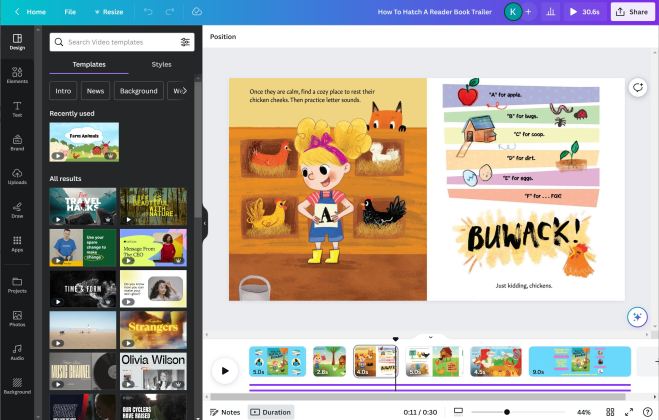
For audio, I found I had an app already on my computer called Voice Recorder. Then, my voiceover artists (aka kiddos) worked their magic in four thirty-second takes (two to work through giggle fits and a ringing doorbell) and suddenly we had the audio file. Quick note, I later found you can also record through Canva! I loaded my audio file, adjusted the timing duration of each page to fit the audio file duration, and selected the animations I wanted to use to transition between pages.
Suddenly, a once daunting task turned out to be very simple! I had a thirty-second book trailer voiced over by the same kiddos that inspired this book! I shared it with my publisher Gnome Road for final sign-off and they LOVED it! Now, I’d like to report back that this whole process was completely free, but my voice-over artists earned every bit of their ginormous ice cream sundae!
Thank you, Beth, for hosting me for a Behind The Scenes blog!
For easy access, Kari has uploaded her trailer to You Tube for us:
Don’t forget to leave a comment below to get into the drawing for a “20-minute Ask Me Anything” with Kari, or a copy of HOW TO HATCH A READER! (Book choice US addresses only, please. Winner announced 9/29/23.)
Bio: Kari Gonzalez is a writer of children’s books and the author of HOW TO HATCH A READER and three forthcoming picture books. She loves writing funny and lyrical picture books and also writes middle-grade and young adult novels-in-verse. Four plucky chickens are kind enough to share their home with Kari, her husband, and their two little girls. When she is not regaling her family with tall tales or creating colorful characters for her stories, you will find Kari reading voraciously or stuffing her double-decker little free library full of books.
 Beth Anderson, Children's Writer
Thanks for sharing, @KariGonzalez! So helpful!
LikeLiked by 1 person
Glad it was helpful, Lynne Marie!
LikeLiked by 1 person
I’m inspired! And far less daunted than before—thank you! And congratulations on your new book!!
LikeLiked by 1 person
Good to hear, Lindsay and thank you so much!
LikeLiked by 1 person
Canva is the best! Thank you for sharing your process.
LikeLiked by 1 person
Isn’t it amazing?! I love Canva! I’m so happy to hear it was helpful.
LikeLiked by 1 person
Thanks for sharing! We watched this earlier today! How fun to include your girls.
LikeLiked by 1 person
I adore how excited my kids have been in celebrating every milestone with me and this was icing on a well frosted cake! Thanks for coming by the blog!
LikeLiked by 2 people
Kari, you know how much I’ve enjoyed your journey and having your children as cheerleaders is certainly part of that!
LikeLiked by 1 person
Thanks so much for breaking down what I fear is a daunting task. Now, I really need to learn Canva! And what a great idea for a book!
LikeLiked by 1 person
Thanks so much, Carol! I’m glad it was helpful!
LikeLiked by 1 person
This is adorable. You (and your kids) did a fabulous job!!
LikeLiked by 1 person
Thank you, Lori!
LikeLiked by 1 person
The best audience to please.
LikeLiked by 1 person
Thanks for stopping by the blog, Pat!
LikeLiked by 1 person
This was fun to read and very informational. I love that you got kids excited and involved in the process. I would love to win a copy of this fun book.
LikeLiked by 1 person
Thank you so much, Danielle!
LikeLiked by 1 person